


Draw Anime: AR Tracing App
4.763.00 Reviews
App Specs
- Version
- 4.3
- Updated On
- License
- Free
- Downloads
- 1,000,000+
- Developer
- trimt
- Categories
- Art & Design
- Platform
- Android
Screenshots
 Analysis by AppCompare
When I decide whether to recommend a drawing app, I look at what it helps me do with a pencil and paper, not just how attractive its screen looks. Draw Anime: AR Tracing App is aimed at people who want a guided way into anime drawing, especially if a blank page feels like the hardest part. Its mix of camera-based tracing and step-by-step instruction makes it a different proposition from a conventional digital sketchbook: the goal is to help you work on paper, with your phone serving as a guide.
That distinction matters. If you want to paint directly on a tablet, manage layers, or build a polished digital illustration, a full drawing program is likely a better fit. If you want a low-pressure way to practise line placement and get a character outline started, the tracing approach is more immediately approachable. I’d treat it as a learning aid rather than a replacement for drawing practice; the most useful results come when you gradually rely less on the overlay.
Who will get the most from it
I can see this working well for a beginner who enjoys anime but hasn’t learned how to break a face or figure into simple shapes. It can also suit a parent looking for a creative activity to do alongside a child, or someone who wants a short drawing session at a desk without setting up a digital art workflow. The app is free, has an Everyone age rating, and is made by trimt. It has a 4.7 average from around 8,600 ratings, with over 1 million installs, so it has attracted a sizeable audience.
For a practical first session, I’d choose a simple design, put the paper on a steady surface, and set the guide so it is visible without overpowering my own marks. I’d focus on the outer shape and the placement of the eyes before worrying about small details. That gives me a drawing I can learn from, rather than a page full of hurried lines. Afterward, I’d try sketching the same subject without the overlay to see which proportions I can remember.
How it compares with other ways to learn
Compared with a printed tutorial or a video, AR tracing puts a visual guide directly over the surface where I’m drawing. That can make it easier to judge where a line belongs, though it also encourages copying more than interpreting. A paper reference image gives more freedom to draw at my own pace and change the pose, while a digital sketch app is better for editing, layers, and undoing marks. The useful question is not which format is universally best, but whether I need help getting a first outline onto paper or want tools for developing a finished digital piece.
There is a trade-off in using a phone camera as part of a drawing session: I need a stable setup and enough room to see both the guide and the paper. If the phone shifts, the projected reference may no longer line up with my marks, so I would avoid balancing it precariously or trying to draw while holding it. The app’s overlay is most useful when I can keep the device still and work in short, deliberate strokes.
For a casual routine, I might use it during a quiet half-hour at home: pick one character, trace the broad shapes, then spend a few minutes repeating those shapes freehand in a notebook. That small change turns tracing into practice rather than just copying. If I’m drawing on the go, working with a tiny page, or hoping to use a stylus and digital layers, I’d choose another method instead.
Worth Reading Before You Choose

Flipboard Shows What News Apps Must Do Beyond the Feed

Switching to Android Auto Means Rethinking Your Driving Routine

Google Calendar Makes a Crowded Week Easier to Manage

Ludo King Makes the Most of the Minutes Between Plans

Baby Panda World Brings Quick Play to Modern Phones, but Its Game Library Feels Busy

ESPN’s Live Game View Makes Following Close Games Easier
Getting Started with the App
First things first, downloading the app is a breeze. It’s available for both Android and iOS, so no worries if you're team Android or team Apple. Once installed, you're greeted with a user-friendly interface that's simple enough for beginners but packed with features that even seasoned artists will appreciate.
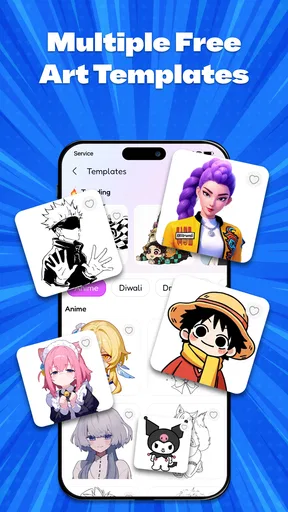
Once you’ve opened the app, you’ll notice a variety of anime characters and scenes to choose from. Whether you're into classic anime heroes or modern fantasy characters, there's something to catch your eye. The app's library is constantly updated, so you’ll never run out of inspiration.
The Magic of AR Tracing
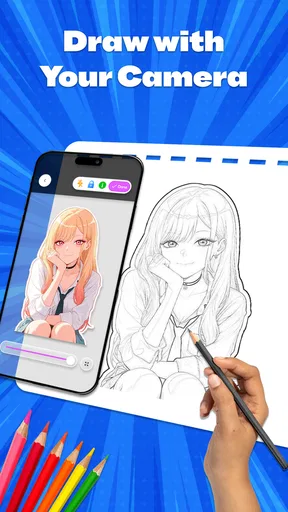
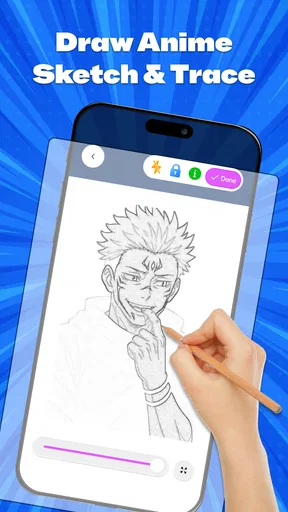
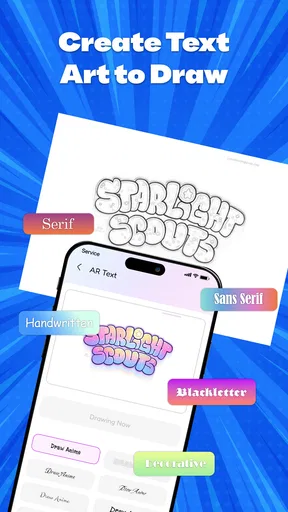
The true magic of Draw Anime: AR Tracing App lies in its augmented reality capabilities. By using your device’s camera, the app overlays an image onto your drawing surface. This means you can trace directly onto paper, making it feel like the character is jumping right off the screen and onto your page.
I tried this feature with a few simple characters to start, and let me tell you, it's a game-changer. The app even allows you to adjust the opacity of the overlay, so you can choose how visible you want the guide to be. It's like having a digital lightbox that you can take with you anywhere.
Learning and Improving
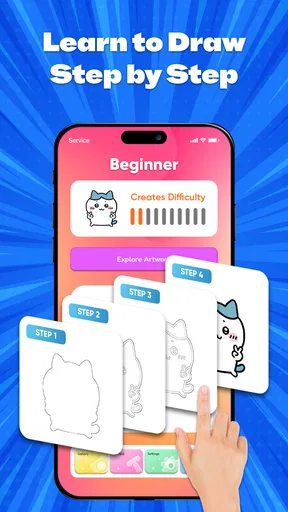
One of the highlights of this app is its educational value. Each character comes with step-by-step tutorials that guide you through the drawing process. These aren’t just random instructions; they’re carefully crafted to help you understand proportions, shading, and other essential techniques.
For those who want to take their skills up a notch, the app includes challenges that encourage you to draw without tracing, using the skills you’ve picked up along the way. It's a great way to build confidence and see how much you've improved.
Features That Stand Out
Aside from the AR tracing, there are a few features that really make this app shine. For starters, the ability to save your progress is a lifesaver. If you’re anything like me, you might start a drawing and get interrupted by, well, life. The app allows you to pick up right where you left off without missing a beat.
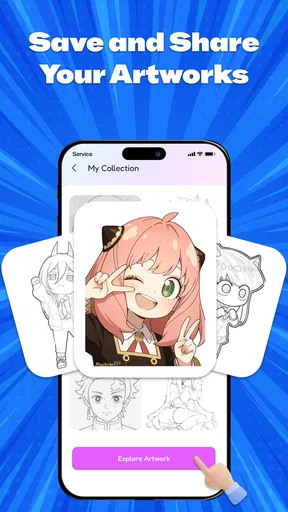
There's also a community feature where you can share your artwork and get feedback from other users. It's a supportive environment where you can learn from others and maybe even show off your masterpieces. Plus, the app frequently hosts drawing contests with fun themes and cool prizes.
What to know before you settle in
Because this is an art-and-design app rather than a general-purpose canvas, I’d begin by deciding what I want from a session. If the aim is to practise a particular character or learn how a guided example is put together, the tutorials and tracing route make sense. If I already know what I want to draw and mainly need brushes, layers, precise selection, or flexible revisions, I’d start in a dedicated digital art app instead. The right choice depends on whether I’m trying to learn a drawing or produce an editable illustration.
The app’s current version is 3.6 and it requires Android 8.0 or later. Before installing, I’d check that the device I plan to use is compatible, particularly if it is an older phone or tablet. Since AR tracing relies on viewing the drawing surface through the device, a larger screen may be more comfortable to work with, but the important thing is having a stable position and enough clear space for the page.
One helpful way to get more learning out of a guided drawing is to pause between stages. I’d look at the step, make the main marks, then briefly hide or ignore the guide and ask myself what the next shape is doing: is it setting the head angle, spacing the features, or defining the silhouette? That quick check keeps the exercise from becoming purely mechanical. I’d also keep a separate page for trying the same form from memory; it makes progress easier to notice than comparing only finished pictures.
There’s a practical limit to tracing that is worth keeping in mind. A clean copy can feel satisfying, but it doesn’t automatically teach how to invent a new pose or draw a character from an unfamiliar angle. The untraced challenges are therefore more than an optional extra in spirit: they are the bridge between following a guide and making independent choices. If those are the skills I care about most, I’d use the app alongside ordinary sketching rather than expecting the overlay to teach everything by itself.
Cost, commitment, and choosing an alternative
The app is free to download, with in-app purchases listed at $9.99 per item. I’d try the basic drawing flow first and decide whether it fits my habits before spending anything. Someone who only wants a few guided sessions may be perfectly happy exploring the free experience; someone who draws regularly should judge any paid item by whether it adds something they will actually use. There is no reason to buy on day one just because the app has optional purchases.
Switching from a paper tutorial to AR tracing is a small change in materials but a meaningful change in posture: instead of glancing back and forth between a reference and a page, I’m working with the phone positioned above or beside the paper. Moving later to a digital art app is a bigger change, because my marks, corrections, and finished work would be handled on-screen rather than on paper. I wouldn’t treat drawings made here as automatically portable into another workflow; I’d keep the physical sketches I care about and photograph them separately if I want a record.
The app has 31 reviews alongside its larger rating count, so I’d read the overall 4.7 average as a useful sign of broad satisfaction, not proof that every feature suits every artist. Individual expectations vary: a new learner may value clear guidance, while someone experienced may find tracing restrictive. The strongest reason to choose this app is the combination of anime-focused instruction and a paper-based AR workflow, not a promise that it will replace an art class or a full-featured drawing program.
Final Thoughts
If you've ever wanted to dive into the world of anime art but didn't know where to start, Draw Anime: AR Tracing App is your perfect gateway. It's both a fun and educational tool that makes learning to draw anime accessible and enjoyable.
Whether you're just doodling for fun or aiming to refine your skills, this app is like having a personal art tutor who’s always ready to guide you through each stroke. So, go ahead, give it a whirl, and unleash your inner anime artist. Who knows? You might just discover a hidden talent you never knew you had!
My recommendation
I’d recommend it most to someone who wants a structured, hands-on way to start drawing anime on paper and is willing to use tracing as a stepping stone. Its strongest case is a beginner who benefits from seeing a guide on the page, then wants to practise the same shapes without help. I’d skip it if my priority were advanced digital editing, original character design from scratch, or a completely screen-free hobby. For those goals, a conventional sketchbook, reference material, or a dedicated digital drawing tool may be a better match.
Overall, I see this as a focused entry point, not an all-purpose art studio. Use the overlay to get past the intimidating blank page, take advantage of the guided steps, and make time to redraw what you’ve learned independently. If that sounds like the kind of support you want, the free starting point makes it easy to see whether the workflow feels natural before deciding how much of it belongs in your regular drawing routine.
Pros
- Easy-to-use interface for beginners.
- Variety of anime templates available.
- Augmented reality features enhance tracing.
- Offline mode for drawing anywhere.
- Regular updates with new templates.
Cons
- Limited free content without subscription.
- High battery usage with AR features.
- Occasional lag on older devices.
- Ads can interrupt the drawing process.
- Requires stable lighting for best AR use.
FAQs for Draw Anime: AR Tracing App
What is Draw Anime: AR Tracing App?
Draw Anime: AR Tracing App is an innovative application designed to help users learn how to draw anime characters using augmented reality technology. By projecting digital outlines onto a physical surface, users can trace and refine their drawing skills with ease, making it ideal for both beginners and experienced artists.
How does the AR tracing feature work?
The AR tracing feature uses your device's camera to overlay digital outlines of anime characters onto your drawing surface. As you look through your device, you can see the outlines and trace them directly onto paper, providing a guided drawing experience that enhances skills and boosts confidence.
Is the app suitable for beginners?
Yes, Draw Anime: AR Tracing App is perfect for beginners. It offers step-by-step guides and a variety of difficulty levels, enabling newcomers to gradually improve their drawing skills. The AR tracing feature simplifies complex shapes, making it easier for users to understand proportions and detailing.
What are the device requirements for using this app?
To use Draw Anime: AR Tracing App, you need a smartphone or tablet with an AR-compatible camera. The app is available on both Android and iOS platforms, so ensure that your device’s operating system is up to date to enjoy the full range of features and a smooth user experience.
Are there any in-app purchases or subscriptions?
Yes, while Draw Anime: AR Tracing App offers a free version with basic features, it also includes in-app purchases and subscription options. These unlock additional templates, tutorials, and advanced tools that can further enhance your drawing experience and provide more comprehensive learning resources.


